Technical SEO Audit Checklist is a structured process for finding and fixing website issues that prevent search engines and AI systems from crawling, indexing, understanding, and trusting your content. For WordPress sites, it covers robots.txt, XML sitemaps, canonicals, Core Web Vitals, schema markup, HTTP status codes, internal links, AI crawlers, security, and monitoring. Triomize helps website owners turn this audit into a repeatable SEO, AEO, and GEO workflow.
Table of Contents
- What Is a Technical SEO Audit?
- Why Does Technical SEO Matter More in 2026?
- What Belongs on a Technical SEO Audit Checklist?
- How Do You Audit Crawlability?
- How Do You Audit Indexing?
- How Do You Audit Site Performance?
- How Do You Audit HTTP Status Codes?
- How Do You Audit Structured Data?
- How Do You Audit Content Health?
- How Do You Audit AI Search Readiness?
- How Do You Audit Security?
- How Do You Audit Monitoring?
- What Are Common Technical SEO Mistakes?
- How Does Triomize Simplify Technical SEO?
- What Is the Final Technical SEO Audit Checklist?
- What Should You Remember About Technical SEO Audits?
What Is a Technical SEO Audit?
A Technical SEO Audit Checklist is a step-by-step review of the technical signals that help search engines access, understand, and rank a website. It is not about rewriting every page. It is about checking whether your site is healthy enough for your content to perform.
In simple terms, technical SEO answers questions like:
- Can Googlebot crawl the page?
- Can Bingbot discover the URL?
- Is the page indexable?
- Does the canonical tag point to the right version?
- Does the page load quickly on mobile?
- Does structured data describe the content correctly?
- Do AI crawlers have access to public content?
- Are important pages internally linked?
A WordPress site can publish excellent content and still underperform if the technical foundation is broken. A blocked sitemap, bad redirect chain, slow template, broken schema, or accidental noindex tag can stop good content from being seen.
That is why technical audits should be part of every content workflow, not a once-a-year emergency task.
Why Does Technical SEO Matter More in 2026?
Technical SEO matters more in 2026 because search discovery now includes Google Search, Bing, AI Search, ChatGPT, Perplexity, Gemini, and other retrieval systems. Your site must be accessible to more than one crawler and understandable by more than one search surface.
Google still depends on crawlability, indexing, links, structured data, and page quality. AI-powered systems also need accessible pages, clear answers, entity context, schema, citations, and fresh content. If the technical layer fails, SEO, AEO, and GEO all become weaker.
The stakes are measurable. Google Core Web Vitals still use clear thresholds: LCP should be 2.5 seconds or less, INP should be 200 milliseconds or less, and CLS should be 0.1 or less at the 75th percentile of page loads. XML sitemaps have limits too. Google sitemap documentation supports sitemap files up to 50MB uncompressed and 50,000 URLs per sitemap. IndexNow documentation allows submitting up to 10,000 URLs in a single POST request.
AI search also changes user behavior. Pew Research Center analyzed 68,879 Google searches and found users clicked a traditional result 8% of the time when an AI summary appeared, compared with 15% when no AI summary appeared. This makes clean technical visibility even more important. If fewer clicks are available, every eligible surface matters.
What Belongs on a Technical SEO Audit Checklist?
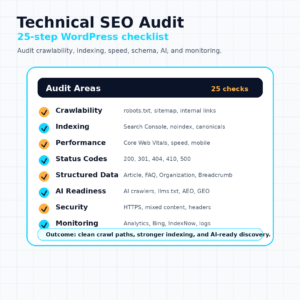
A technical SEO audit checklist should cover crawlability, indexing, performance, status codes, structured data, content health, AI readiness, security, and monitoring. Use the 25 steps below as a repeatable WordPress audit workflow.
| Audit area | What to check | Why it matters |
|---|---|---|
| Crawlability | robots.txt, sitemaps, internal links | Crawlers need a path into your site |
| Indexing | Search Console, noindex, canonicals | Important pages must be eligible for search |
| Performance | Core Web Vitals, mobile, speed | Slow pages reduce user experience and crawl efficiency |
| Status codes | 200, 301, 404, 410, 500 | Bots need clean server signals |
| Structured data | Article, FAQ, Organization, Breadcrumb | Machines need context |
| Content health | Thin pages, duplicates, broken links | Weak pages waste crawl and trust |
| AI readiness | AI crawlers, llms.txt, AEO, GEO | AI systems need access and structure |
| Security | HTTPS, mixed content, headers | Trust starts with safe delivery |
| Monitoring | Search Console, Analytics, Bing, IndexNow | Technical SEO needs ongoing checks |
How Do You Audit Crawlability?
Crawlability means search engines and AI crawlers can access your important public pages. If they cannot crawl the page, they cannot rank, extract, cite, or summarize it.
Step 1: Review robots.txt. Make sure you are not blocking important areas like /blog/, /wp-content/uploads/, or key landing pages. Google’s robots.txt guidance says robots.txt is mainly for managing crawler traffic, not hiding sensitive content.
Step 2: Check your XML sitemap. Your sitemap should include canonical, indexable URLs only. Exclude redirects, duplicate pages, noindexed URLs, 404 pages, and private content. Remember the 50,000 URL and 50MB sitemap limits.
Step 3: Audit internal links. Google says every page you care about should have a link from at least one other page on your site. Use descriptive anchor text instead of vague anchors like “click here.”
Strong crawlability is the base layer of every SEO vs AEO vs GEO workflow.
How Do You Audit Indexing?
Indexing means a search engine can include a page in its searchable database. A crawlable page is not always indexable.
Step 4: Review Google Search Console indexing reports. Look for errors, excluded pages, duplicate pages, and unexpected noindex issues.
Step 5: Compare indexed pages with important pages. Search Console should roughly match your intended indexable URL set. A large gap may mean crawl, quality, or canonical problems.
Step 6: Check noindex tags. WordPress settings, SEO plugins, staging plugins, and theme templates can accidentally noindex valuable pages.
Step 7: Audit canonical tags. Every important page should point to the correct canonical URL. Avoid canonical chains, self-conflicts, and canonicals pointing to noindexed pages.
Indexing errors often hide in plain sight. They are especially common after site migrations, redesigns, plugin changes, or staging pushes.
How Do You Audit Site Performance?
Site performance affects user experience, crawling efficiency, and page quality. For WordPress sites, performance problems often come from heavy themes, unused plugins, large images, render-blocking scripts, and poor hosting.
Step 8: Check Core Web Vitals. Use Search Console, PageSpeed Insights, Lighthouse, and real user data where available. Aim for LCP under 2.5 seconds, INP under 200 milliseconds, and CLS under 0.1.
Step 9: Test mobile friendliness. Google uses mobile-first indexing. Important content, links, and schema should be available on mobile.
Step 10: Improve page speed. Compress images, use caching, reduce unused scripts, choose fast hosting, and avoid bloated page builders where possible.
Performance is not just a score. It affects whether users stay, whether crawlers can efficiently fetch pages, and whether AI systems retrieve content cleanly.
How Do You Audit HTTP Status Codes?
HTTP status codes tell crawlers what happened when they requested a URL. Clean status codes make crawling and indexing easier.
Step 11: Confirm important pages return 200. A 200 response means the page loaded successfully. Your key posts, pages, category hubs, and landing pages should return 200.
Step 12: Review 301 redirects. A 301 means a URL permanently moved. Use it for old pages that have a clear replacement. Avoid redirect chains like A to B to C.
Step 13: Fix important 404 errors. A 404 means the page was not found. This is normal for removed content, but harmful when internal links point to missing pages.
Step 14: Use 410 when content is intentionally gone. A 410 tells crawlers the page is gone. Use it when content should not return and has no replacement.
Step 15: Investigate 500 errors. A 500 means server error. These are urgent because they can block crawling and hurt user trust.
Examples:
| Status | Meaning | Example |
|---|---|---|
| 200 | OK | Blog post loads normally |
| 301 | Permanent redirect | Old slug redirects to new slug |
| 404 | Not found | Deleted page has no replacement |
| 410 | Gone | Expired campaign page removed forever |
| 500 | Server error | PHP or hosting failure blocks page |
How Do You Audit Structured Data?
Structured data helps search engines and AI systems understand page type, entities, authors, breadcrumbs, and FAQs. It does not guarantee rankings, but it improves machine-readable clarity.
Step 16: Check Article Schema. Blog posts and guides should clarify headline, author, publisher, datePublished, dateModified, and image.
Step 17: Check FAQ Schema. Use FAQ Schema only when the same questions and answers are visible on the page.
Step 18: Check Organization Schema. Your brand name, logo, URL, and sameAs links should be consistent.
Step 19: Check Breadcrumb Schema. BreadcrumbList helps crawlers understand site hierarchy and content clusters.
Step 20: Use Speakable carefully. Speakable markup is not appropriate for every page, but it can support voice-oriented content where relevant and valid.
Use Google’s Rich Results Test and Schema.org Validator after major edits. For deeper guidance, read Schema Markup for AI Search.
How Do You Audit Content Health?
Content health checks whether your indexable pages are useful, distinct, current, and internally supported. Technical SEO is not only server settings. It also includes crawl quality.
Step 21: Find thin pages. Thin pages have little unique value. Merge, improve, noindex, or remove them.
Step 22: Find duplicate pages. Duplicates can come from tags, feeds, parameters, archives, printer pages, and pagination.
Step 23: Fix broken links. Broken internal links waste crawl paths and hurt users.
Step 24: Update outdated content. Old statistics, screenshots, schema, and advice reduce trust.
Content health connects directly to Topical Authority and Entity SEO. A healthy site builds connected clusters instead of isolated, stale pages.
How Do You Audit AI Search Readiness?
AI search readiness checks whether your site can be discovered, parsed, and cited by AI systems. This is where technical SEO connects to AEO and GEO.
Step 25: Review AI crawler access. Check whether important public content is accessible to relevant AI crawlers. This may include OpenAI, Perplexity, Anthropic, Google, and Bing-related agents depending on your policy.
AI readiness also includes:
- Direct answers near the top of important pages.
- Question-led headings.
- Clear entities and schema markup.
- Original statistics and credible citations.
- Internal links to related topic clusters.
- Updated content and visible trust signals.
- Optional documentation files like llms.txt when useful.
Read AI Crawler Monitoring, What Is llms.txt?, Google AI Overviews, Perplexity SEO, and How to Get Cited by Perplexity AI for the AI layer.
How Do You Audit Security?
Security is part of technical trust. Users, browsers, search engines, and AI crawlers all benefit from safe delivery.
Check these items:
- HTTPS is active on every page.
- HTTP redirects cleanly to HTTPS.
- No mixed content warnings appear.
- Security headers are configured where possible.
- WordPress core, themes, and plugins are updated.
- Admin pages are protected.
- Spam pages and hacked URLs are removed.
A site that is unsafe or hacked can lose trust quickly. Technical SEO should always include security review.
How Do You Audit Monitoring?
Monitoring keeps technical SEO from becoming outdated. A clean audit today can become messy after plugin updates, migrations, content changes, or server changes.
Set up these monitoring sources:
- Google Search Console.
- Google Analytics or another analytics platform.
- Bing Webmaster Tools.
- IndexNow.
- Server logs or crawl logs.
- Uptime monitoring.
- AI crawler monitoring.
IndexNow can be useful for fast URL notifications. The official documentation says a successful request returns HTTP 200, and a POST request can submit up to 10,000 URLs at once.
Technical SEO is strongest when monitoring catches issues before traffic drops.
What Are Common Technical SEO Mistakes?
Common technical SEO mistakes usually come from accidental settings, plugin conflicts, poor migration planning, or ignoring crawl data.
Avoid these issues:
- Blocking Googlebot. Check robots.txt after every migration or security change.
- Broken sitemap. Do not submit URLs that redirect, noindex, or 404.
- Too many redirects. Replace chains with direct 301 redirects.
- Crawl budget waste. Noindex or remove low-value archives, feeds, and duplicate pages.
- Feed pages in the index. WordPress feeds should not compete with normal pages.
- Slow pages. Heavy images, scripts, and plugins can hurt Core Web Vitals.
- Broken schema. Duplicate schema from multiple plugins can confuse machines.
- No AI crawler policy. Decide which AI bots should access public content.
- No monitoring. Search Console and server logs should not be ignored.
Most mistakes are preventable with a repeatable checklist.
How Does Triomize Simplify Technical SEO?
Triomize simplifies technical SEO by turning separate SEO, AEO, and GEO checks into a WordPress publishing workflow. The goal is educational and practical: help website owners see technical and content issues before they become visibility problems.
Triomize can support a technical SEO audit through:
- SEO Score for classic search signals.
- AEO Score for answer-first structure and extractability.
- GEO Score for AI citation readiness and trust signals.
- Schema detection for structured data clarity.
- AI Crawler Monitor for separating AI bots from traditional crawlers.
- Sitemap detection for crawl discovery checks.
- IndexNow support for faster change notification.
- Crawl monitoring for bot activity patterns.
- Issue finder workflows for technical and content problems.
Triomize does not replace Search Console, Bing Webmaster Tools, or analytics. It helps WordPress teams connect those technical signals to the content workflow so fixes happen earlier.
For sites publishing AI search content, this matters because technical SEO is now the foundation for SEO, AEO, and GEO together.
What Is the Final Technical SEO Audit Checklist?
Use this final checklist as a downloadable or copyable audit table for WordPress technical SEO.
| Area | Checked |
|---|---|
| Sitemap | ☐ |
| Robots.txt | ☐ |
| Canonicals | ☐ |
| Indexed pages | ☐ |
| Noindex tags | ☐ |
| 404 errors | ☐ |
| 301 redirects | ☐ |
| 500 errors | ☐ |
| Core Web Vitals | ☐ |
| Mobile friendliness | ☐ |
| Schema markup | ☐ |
| Internal links | ☐ |
| Thin pages | ☐ |
| Duplicate pages | ☐ |
| Broken links | ☐ |
| AI crawlers | ☐ |
| llms.txt | ☐ |
| HTTPS | ☐ |
| Mixed content | ☐ |
| Security headers | ☐ |
| Search Console | ☐ |
| Analytics | ☐ |
| Bing Webmaster Tools | ☐ |
| IndexNow | ☐ |
| Crawl monitoring | ☐ |
What Should You Remember About Technical SEO Audits?
Technical SEO is not a one-time task. As search evolves to include AI-powered discovery, maintaining crawlability, structured data, site health, and monitoring becomes an ongoing process.
A WordPress website should be audited regularly because themes, plugins, sitemaps, redirects, schema, and crawler behavior can change. The best sites do not wait for rankings to drop. They monitor early signals and fix technical issues before they compound.
Use the checklist above, review Search Console and Bing Webmaster Tools, monitor AI crawler access, and use tools like Triomize to simplify identifying and fixing technical issues.
Frequently Asked Questions
What is a technical SEO audit?
How often should I audit technical SEO?
What tools do I need for a technical SEO audit?
Does technical SEO affect AI search visibility?
What is the most important technical SEO fix?