
An llms.txt file is a proposed markdown standard placed in a website root directory to give AI platforms structured documentation. However, real-world data shows it is not a magic visibility bullet. May 2026 empirical study data reveals 97% of llms.txt files receive zero bot fetches, and AI crawlers never go looking for files that do not exist. While platforms like GPTBot and Claude-Code occasionally read them, your primary search priorities must remain structured data, semantic content, technical crawlability, and robust site architecture, a complete foundation scored live inside WordPress by Triomize.
Table of Contents
- What Is llms.txt and Why Does It Matter?
- What Do Empirical Findings Reveal About llms.txt Traffic?
- Why Was llms.txt Created?
- How Does llms.txt Work?
- How Does llms.txt Compare to robots.txt?
- Which AI Platforms Support llms.txt?
- How Should You Create an llms.txt File?
- Does llms.txt Improve SEO or GEO?
- What Are the Common Mistakes When Using llms.txt?
What Is llms.txt and Why Does It Matter?
An llms.txt file is a standardized markdown document hosted in a website root folder designed to provide AI search engines and large language models with concise project documentation. While web browsers render complex HTML, JavaScript, and CSS formatting, artificial intelligence crawlers process plain structured text much faster. The llms.txt specification was introduced to provide a clean table of contents tailored for automated answer engines.
Many marketers misunderstand the actual role of llms.txt. It is not a magic file that explains your content to AI or guarantees higher rankings. Instead, it simply offers AI platforms that choose to support it an optional path to discover additional context and documentation.
The real priorities for AI visibility in 2026 remain structured schema data, technical crawlability, semantic content depth, and strong site architecture. You should view llms.txt as a minor supplementary file rather than a foundational SEO strategy. This balanced perspective explains why the Triomize plugin evaluates your content across independent 100-point scoring matrices for SEO, Answer Engine Optimization (AEO), and Generative Engine Optimization (GEO) rather than relying on a single technical trick.
This guide explores what real traffic findings reveal about llms.txt, why the specification was created, how it compares to robots.txt, and whether your team should implement it today.
What Do Empirical Findings Reveal About llms.txt Traffic?
Despite widespread discussion across the digital marketing industry, empirical fetch data paints a realistic picture of how AI engines interact with root markdown files. Recent web analytics research conducted by industry-leading SEO and server log organizations reveals how infrequently these files are actually accessed.
Consider these top empirical findings published across landmark industry research reports:
- Ahrefs Web Analytics Study (June 2026): In their analysis across 137,000 tracked domains reported by Search Engine Journal, Ahrefs found that while 28% of tracked domains published an llms.txt file, 97% of those published files received zero traffic in May 2026. Nothing fetched them at all.
- Bot Traffic Dominance: Among the tiny 3% fraction of llms.txt files that received any requests, 96% of successful fetches came from automated bots rather than human visitors.
- Named AI Crawlers: Ahrefs reported that 19.5% of bot fetches originated from recognized AI tools. Notably, coding agents like GPTBot ranked first and Claude-Code ranked second, sitting ahead of general consumer AI search bots.
- Audit Tool Echo Chamber: Roughly 12% of total fetches originated from the search industry auditing itself, including GEO readiness scanners, SEO audit platforms, and academic researchers.
- SE Ranking AI Citation Analysis (~300,000 Domains): Independent research by SE Ranking evaluated nearly 300,000 websites and demonstrated zero statistical correlation between publishing an llms.txt file and earning AI brand citations. In fact, removing llms.txt presence from their predictive classification models actually improved model accuracy.
- Limy.AI Server Log Study (500M+ Events): A 90-day server log audit conducted by Limy.AI revealed that across more than 500 million recorded AI bot events, only about 408 requests specifically targeted an llms.txt file path.
- Otterly.AI Research (62,100 Visits): Log monitoring by Otterly.AI showed that out of 62,100 AI crawler visits, only 84 requests sought out an llms.txt file, representing just 0.1% of total AI bot activity.
- Zero Blind Probing: Across every major data set, researchers noted that zero requests came from AI bots searching for llms.txt files that did not exist on the server. AI crawlers never blindly probe missing root paths.
- Chrome Lighthouse Audits: Automated Lighthouse performance checks accounted for roughly 1 in every 1,000 recorded requests.
These independent reports from Ahrefs, SE Ranking, Limy.AI, and Otterly.AI confirm that publishing an llms.txt file will not automatically attract AI search engines. If an AI platform does not already crawl and trust your core pages through traditional Search Engine Optimization, an llms.txt file sits untouched.
Why Was llms.txt Created?
The llms.txt specification was created by developer Jeremy Howard and open-source contributors to solve a real technical challenge: traditional HTML pages contain kilobytes of visual stylesheets, tracking scripts, and navigational menus that add zero factual value during language model summarization.
When developers build complex software libraries or API documentation, feeding raw HTML into an LLM context window wastes compute tokens and increases hallucination risks. As documented in the official llms.txt specification, providing a condensed plain-text index allows developer tools and code assistants to read technical documentation efficiently.
While the file format thrives within software documentation ecosystems, general commercial websites experience minimal benefit unless their underlying technical SEO is already perfected.
How Does llms.txt Work?
An llms.txt file works by hosting a plain markdown file at the root level of your domain, resolving at https://example.com/llms.txt. Notice that while the file extension is text or markdown, your URL slug inside WordPress post titles should remain clean, such as /llms-txt/, to avoid routing syntax conflicts.
A compliant file structure typically contains three straightforward elements:
- Project Header: A clear H1 title stating the organization name and core mission.
- Concise Summary: A short introductory block summarizing primary products or documentation themes.
- Markdown Hyperlinks: A bulleted list of direct links pointing to plain-text markdown versions of core educational articles or API references.
When code assistants like Claude-Code or scrapers like GPTBot process this structured list, they ingest verified brand facts without parsing visual page layouts.
How Does llms.txt Compare to robots.txt?
Understanding the difference between llms.txt, robots.txt, and sitemap files prevents critical server misconfigurations. While all three reside in your root folder, their operational authority differs vastly.
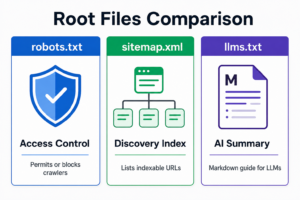
According to Google’s crawling guidelines, a robots.txt file strictly enforces access control by permitting or blocking user agents. An XML sitemap serves as a comprehensive map of all indexable URLs for traditional search engines. In contrast, an llms.txt file acts purely as an optional markdown summary for AI tools.
Here is a side-by-side comparison illustrating how these three files operate:
| Feature Comparison | robots.txt | sitemap.xml | llms.txt |
|---|---|---|---|
| Primary Purpose | Control server access and block unauthorized crawlers | List all indexable URLs to assist search engine discovery | Provide an optional markdown summary for AI platforms |
| Target Audience | Search engine crawlers and automated scrapers | Traditional search engines like Google and Bing | Large language models and coding assistants |
| File Syntax | Plain text syntax with Allow and Disallow directives | Extensible Markup Language (XML) tags | Markdown (MD) formatting with bulleted links |
| Enforcement | Mandatory access standard respected by legitimate bots | Advisory discovery map used for search indexing | Voluntary emerging standard rarely fetched by general AI |
| Traffic Share | Checked on nearly 100% of crawler crawl sessions | Regularly polled by search engine bots | 97% of published files receive zero fetches |
You must never rely on an llms.txt file to manage bot permissions. AI crawlers always evaluate your robots.txt directives first before reading any page content.
Which AI Platforms Support llms.txt?
In 2026, real-world adoption of llms.txt remains concentrated among technical coding assistants and specialized developer bots rather than general consumer search interfaces.
Empirical traffic monitoring shows clear behavioral splits across major AI platforms:
- GPTBot: Represents the highest share of live AI fetches, primarily indexing structured developer references and documentation mirrors.
- Claude-Code: Ranks second in active fetches, leveraging clean markdown files to assist software engineers during coding sessions.
- Perplexity AI: Occasionally accesses clean markdown summaries when researching highly technical or open-source repositories.
- Google AI Overviews: Relies primarily on traditional search indexing, semantic HTML hierarchy, and entity knowledge graphs rather than root markdown files.
To evaluate whether your pages satisfy these varied extraction standards, marketing teams use content intelligence platforms like Triomize to run live diagnostic checks across all three search layers.
How Should You Create an llms.txt File?
If your website hosts technical documentation, deploying an llms.txt file is a quick technical task that requires basic text editing.
Follow these simple implementation steps:
- Create a Plain Text File: Open a standard text editor and save a new document named exactly
llms.txt. - Write a Header Title: Add a markdown H1 heading containing your official brand name.
- Summarize Your Core Offering: Write two factual sentences explaining what your organization provides.
- Curate High-Priority Links: Add bulleted hyperlinks pointing to your most important educational guides or plain markdown file versions.
- Upload to Root Directory: Place the file inside your server root directory so it loads at
https://yourdomain.com/llms.txt.
When managing content workflows inside WordPress, running your articles through the live Triomize scoring matrix ensures your core pages remain fully extractable before you worry about root markdown files.
Does llms.txt Improve SEO or GEO?
Deploying an llms.txt file will not improve your organic keyword rankings on Google or Bing. Furthermore, because 97% of these files receive zero traffic, creating one will not single-handedly boost your Generative Engine Optimization (GEO) performance.
AI search platforms evaluate entity trust by examining consensus across high-ranking web pages. If your website lacks strong semantic content, authoritative external backlinks, and clean schema markup, AI engines will not cite your brand regardless of what root files you publish.
To master the foundational principles of modern search discoverability, explore our comprehensive breakdown of SEO vs AEO vs GEO. You can also compare core algorithmic ranking metrics in our guide to GEO vs SEO, or review wider generative AI industry shifts in our analysis of GEO in 2026.
What Are the Common Mistakes When Using llms.txt?
Because the llms.txt topic generates frequent industry speculation, digital teams often fall into predictable technical traps. Avoiding these missteps keeps your marketing strategy focused on what actually drives results.
Avoid these critical mistakes:
- Assuming AI Bots Will Search for It: Analytics prove that AI crawlers make zero requests for missing llms.txt files. If bots are not already crawling your domain, creating the file accomplishes nothing.
- Ignoring Core SEO Fundamentals: Prioritizing an llms.txt file over site speed, mobile responsiveness, and internal linking is a recipe for failure. Traditional SEO remains the mandatory gateway to AI citations.
- Stuffing Promotional Keywords: Adding marketing hype or keyword stuffing into a markdown summary clutters the LLM context window and damages factual trust.
- Blocking AI Crawlers in robots.txt: If your
robots.txtfile disallows agents likeGPTBotorClaudeBot, those bots cannot read your markdown documentation.
By verifying your posts against the Triomize 100-point scoring engine before publishing, you maintain strict technical alignment across search, answer extraction, and generative citations.
Frequently Asked Questions
What is an llms.txt file?
Do I really need an llms.txt file in 2026?
What is the difference between llms.txt and robots.txt?
Will adding an llms.txt file boost my Google SEO rankings?
How do AI bots discover my llms.txt file?