

Core Web Vitals are Google’s user experience metrics for measuring loading performance, responsiveness, and visual stability. They remain part of Google’s page experience signals in 2026, but passing Core Web Vitals alone does not guarantee higher rankings. For website owners, the real goal is to provide a fast, responsive, and stable experience while maintaining strong content, technical SEO, and search relevance.
Table of Contents
- What Are Core Web Vitals?
- What Are Good Core Web Vitals Scores?
- Do Core Web Vitals Still Matter for SEO in 2026?
- Does Google Use Core Web Vitals as a Ranking Factor?
- How Do Core Web Vitals Compare with Page Speed?
- How Do You Check Core Web Vitals?
- How Does Google Search Console Help?
- How Does PageSpeed Insights Help?
- How Does Lighthouse Help?
- How Does Chrome DevTools Help?
- What Causes Poor Core Web Vitals?
- What Causes Poor LCP?
- What Causes Poor INP?
- What Causes Poor CLS?
- How Do You Improve Core Web Vitals?
- How Do You Improve LCP?
- How Do You Improve INP?
- How Do You Improve CLS?
- Do Core Web Vitals Matter for AI Search?
- How Do Core Web Vitals Affect WordPress Sites?
- How Can Triomize Help with Core Web Vitals and Technical SEO?
- What Should You Remember About Core Web Vitals?
What Are Core Web Vitals?
Core Web Vitals are three Google metrics that measure real-world page experience: loading speed, responsiveness, and visual stability. The current metrics are LCP, INP, and CLS. They help website owners understand whether users can load, interact with, and read a page without delays or unexpected layout movement.
According to Google’s Web Vitals documentation, Core Web Vitals apply to all web pages, should be measured by all site owners, and represent critical user-centric outcomes. Google also says these metrics should be evaluated at the 75th percentile of page loads across mobile and desktop devices. The three metrics are:
| Metric | Full name | What it measures |
|---|---|---|
| LCP | Largest Contentful Paint | Loading performance |
| INP | Interaction to Next Paint | Responsiveness |
| CLS | Cumulative Layout Shift | Visual stability |
LCP measures how quickly the main visible content loads. For most pages, this is the hero image, heading, featured image, or main content block. A slow server, unoptimized image, render-blocking CSS, or heavy theme can hurt LCP.
INP measures how responsive a page feels after a user interacts with it. It replaced FID because FID only measured the first input delay, while INP better reflects responsiveness across interactions. JavaScript-heavy websites, bloated page builders, and third-party scripts often struggle with INP.
CLS measures unexpected layout movement. A page with good CLS feels stable. A page with poor CLS shifts while users are reading or trying to click. Common causes include images without dimensions, ads loading late, fonts changing layout, and dynamic content inserted above existing content.
Core Web Vitals are not abstract scores. They describe how real users experience a page.
What Are Good Core Web Vitals Scores?
Good Core Web Vitals scores are the thresholds Google recommends for LCP, INP, and CLS. To pass, a page should meet the good threshold for all three metrics at the 75th percentile of page loads.
| Metric | Good | Needs Improvement | Poor |
|---|---|---|---|
| LCP | ≤ 2.5s | 2.5 to 4s | > 4s |
| INP | ≤ 200ms | 200 to 500ms | > 500ms |
| CLS | ≤ 0.1 | 0.1 to 0.25 | > 0.25 |
These thresholds come from Google’s Web Vitals guidance. It recommends LCP within 2.5 seconds, INP of 200 milliseconds or less, and CLS of 0.1 or less. Google also recommends measuring at the 75th percentile across mobile and desktop users.
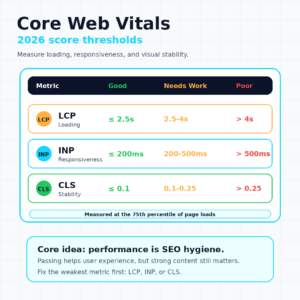
This matters because one weak metric can cause the page to fail the overall Core Web Vitals assessment. A page may load quickly but still fail because of poor INP. Another page may feel fast but fail because content jumps around after load.
Industry data shows many websites still struggle. According to a 2026 analysis of CrUX data, 68.3% of origins had good LCP, 87.1% had good INP, 80.9% had good CLS, but only 55.7% passed all three metrics together. The lesson is simple. Passing one metric is not the same as passing the full experience test.
Do Core Web Vitals Still Matter for SEO in 2026?
Core Web Vitals still matter for SEO in 2026, but they should be treated as page experience signals, not a magic ranking lever. Passing Core Web Vitals can remove a user experience weakness. It does not compensate for poor content, weak relevance, thin topical authority, or technical SEO problems.
According to Google’s page experience documentation, Google’s core ranking systems reward content that provides a good page experience. Google also states there is no single page experience signal and that strong report scores do not guarantee top rankings. Site owners should provide an overall great experience across many aspects.
That means Core Web Vitals are important, but not isolated. A page still needs:
- Helpful content.
- Search intent alignment.
- Crawlability.
- Indexability.
- Internal links.
- Structured data where relevant.
- Mobile usability.
- HTTPS.
- Clear page purpose.
- Trust signals.
A fast page with poor content will not rank just because it passes Core Web Vitals. A high-quality page with terrible responsiveness may underperform because users and crawlers experience friction.
The practical takeaway is this: Core Web Vitals are SEO hygiene. They help protect performance, usability, and user trust. But they are not a standalone SEO strategy.
For a broader technical workflow, read the Technical SEO Audit Checklist.
Does Google Use Core Web Vitals as a Ranking Factor?
Yes, Google uses Core Web Vitals as part of its page experience signals, but they are not a single ranking switch. Google says Core Web Vitals are used by its ranking systems, while also warning that good scores do not guarantee top rankings.
This is the most important distinction for website owners. Core Web Vitals affect SEO, but not in a simple cause-and-effect way.
A better way to think about them:
| Misunderstanding | Better interpretation |
|---|---|
| Passing Core Web Vitals guarantees rankings | Passing removes a potential user experience weakness |
| PageSpeed score equals SEO success | Real user experience is broader than one score |
| Speed matters more than content | Helpful content still matters most |
| Core Web Vitals are only for developers | Site owners should monitor them as SEO hygiene |
Google’s documentation says there is no single page experience signal. Its systems look at a variety of signals that align with overall page experience. That means Core Web Vitals are meaningful, but they work alongside many other signals.
If two pages are similarly helpful, a better user experience may help. If one page is much more relevant and trustworthy, Core Web Vitals alone will not let a weaker page outrank it.
How Do Core Web Vitals Compare with Page Speed?
These metrics and page speed are related, but they are not the same thing. Page speed is a broad concept. Core Web Vitals measure specific user experience outcomes.
A page can feel fast in one test but still have poor field metrics. For example:
- A page can load quickly but shift layout when ads appear.
- A page can show content quickly but respond slowly to clicks.
- A page can pass a lab speed test but fail field data for real users.
- A page can have a good overall score but weak INP.
| Concept | What it means |
|---|---|
| Page speed | General idea of how fast a page loads |
| LCP | How fast the main content appears |
| INP | How fast the page responds to interaction |
| CLS | How stable the layout is while loading |
| Lab data | Controlled test environment |
| Field data | Real user experience data |
This is why these user experience metrics are more useful than a vague statement like “make the site faster.” They show which part of the experience is weak.
For example, if LCP is poor, optimize the hero image and server response. If INP is poor, reduce JavaScript work. If CLS is poor, reserve layout space for images, ads, and injected content.
How Do You Check Core Web Vitals?
You check these metrics with tools that show field data, lab data, and technical diagnostics. Use more than one tool because each one answers a different question.
How Does Google Search Console Help?
Google Search Console shows field performance reporting at the site level. It groups URLs by status and helps you find patterns across templates. This is useful for WordPress sites because many pages share the same theme, plugin stack, and layout.
Use Search Console to identify:
- Poor URL groups.
- Mobile issues.
- Desktop issues.
- LCP, INP, and CLS problems.
- Templates that affect many pages.
How Does PageSpeed Insights Help?
PageSpeed Insights helps diagnose individual URLs. It combines field data where available with lab diagnostics. Use it when you need to understand what is slowing a specific page.
It can show:
- LCP element.
- Render-blocking resources.
- JavaScript issues.
- Image optimization opportunities.
- Layout shift sources.
How Does Lighthouse Help?
Lighthouse gives controlled lab testing. It is useful for debugging, but it does not always match real user field data. Use it to test changes before and after fixes.
How Does Chrome DevTools Help?
Chrome DevTools helps developers inspect performance at a technical level. It can show long tasks, layout shifts, network waterfalls, and JavaScript execution.
The key distinction is simple. Field data tells you what real users experienced. Lab data helps you debug why it happened.
What Causes Poor Core Web Vitals?
Poor scores usually come from heavy assets, slow servers, excessive JavaScript, unstable layouts, and WordPress configuration problems. Each metric has different causes.
What Causes Poor LCP?
Poor LCP happens when the main content takes too long to appear. Common causes include:
- Large hero images.
- Slow server response.
- Render-blocking CSS.
- Poor caching.
- Heavy WordPress themes.
- Too many plugins.
- Slow fonts.
- Unoptimized above-the-fold content.
For many WordPress sites, the LCP element is the featured image or hero banner. If that image is too large, not compressed, or loaded too late, LCP suffers.
What Causes Poor INP?
Poor INP happens when a page is slow to respond after a user interaction. Common causes include:
- Excessive JavaScript.
- Long-running scripts.
- Third-party tracking scripts.
- Heavy event handlers.
- Bloated page builders.
- Chat widgets.
- Unused JavaScript.
- Large frontend frameworks.
INP is often a JavaScript problem. A page can look loaded but still feel sluggish when the user taps a menu, clicks a button, or interacts with a form.
What Causes Poor CLS?
Poor CLS happens when visible elements move unexpectedly. Common causes include:
- Images without width and height.
- Videos without reserved space.
- Ads loading unexpectedly.
- Web fonts changing layout.
- Cookie banners pushing content.
- Dynamic elements inserted above existing content.
- Late-loading embeds.
CLS is frustrating because it affects reading and clicking. Users may tap the wrong button because the page moved.
How Do You Improve Core Web Vitals?
You improve the scores by fixing the weakest metric first. Do not chase a perfect score. Focus on the bottleneck that real users experience.
How Do You Improve LCP?
Improve LCP by making the main content load faster.
Use these fixes:
- Optimize hero images.
- Use modern image formats like WebP or AVIF.
- Compress large images.
- Improve server response time.
- Use page caching.
- Preload critical resources carefully.
- Reduce render-blocking CSS.
- Avoid oversized sliders above the fold.
- Use a lighter theme where possible.
How Do You Improve INP?
Improve INP by reducing main-thread work and JavaScript delays.
Use these fixes:
- Remove unnecessary JavaScript.
- Break up long tasks.
- Reduce third-party scripts.
- Delay non-critical scripts.
- Optimize event handlers.
- Avoid heavy page builder widgets.
- Test forms, menus, filters, and buttons.
- Replace bloated plugins where needed.
How Do You Improve CLS?
Improve CLS by reserving space for elements before they load.
Use these fixes:
- Define image and video dimensions.
- Reserve space for ads.
- Avoid inserting content above existing content.
- Optimize font loading.
- Avoid late-loading banners that push content.
- Use stable embed containers.
- Test mobile layouts carefully.
The best Core Web Vitals work is practical. Find the weak metric. Identify the template or element causing it. Fix the root cause. Recheck field data after enough users experience the updated page.
Do Core Web Vitals Matter for AI Search?
These metrics can matter for AI search indirectly because AI visibility depends on technical accessibility, crawlability, usable content, and search visibility. There is no strong public evidence that ChatGPT, Perplexity, Claude, or Gemini use Core Web Vitals as direct citation factors.
The relationship is better understood like this:
Technical accessibility → crawlability → usable content → search visibility → AI discoverabilityA fast, stable site helps users and crawlers. A slow, broken, unstable site can reduce trust and create retrieval problems. However, AI search visibility also depends on direct answers, schema markup, entity clarity, topical authority, EEAT, and source evidence.
For AI search, These metrics are part of the foundation, not the whole strategy. A technically healthy site is easier to crawl and use. But it still needs content that AI systems can understand and cite.
For the broader AI workflow, read AI Search Optimization.
How Do Core Web Vitals Affect WordPress Sites?
These metrics affect WordPress sites because WordPress performance depends heavily on themes, plugins, hosting, media, and caching configuration. A WordPress site can be fast, but it can also become slow quickly when features stack up.
Common WordPress causes include:
- Too many plugins.
- Heavy multipurpose themes.
- Unoptimized images.
- Page builders.
- Excessive JavaScript.
- Poor hosting.
- Third-party tracking scripts.
- Chat widgets.
- Poor caching configuration.
- Render-blocking CSS.
- Late-loading fonts.
- Ads and embeds.
WordPress website owners should focus on template-level fixes. If every blog post has the same poor LCP, the issue is probably the template, theme, image handling, or server. If only one page fails, the issue may be that page’s hero image, embed, or custom script.
This is why performance metrics belong inside a WordPress AI SEO Checklist and a broader technical audit. Performance is not separate from SEO. It is part of the publishing system.
How Can Triomize Help with Core Web Vitals and Technical SEO?
Triomize can help with performance metrics and technical SEO by making performance awareness part of a broader WordPress optimization workflow. These metrics are not the only ranking signal, but they often reveal technical weaknesses that affect user experience and search visibility.
Triomize analyzes WordPress pages across SEO, AEO, and GEO, helping website owners identify optimization gaps before they affect search visibility. A strong workflow should connect technical health with content quality, answer structure, schema, internal links, and AI readiness.
Use Triomize alongside Google Search Console, PageSpeed Insights, Lighthouse, and Chrome DevTools. Triomize helps you keep the page-level SEO and AI search workflow organized, while Google’s tools diagnose Core Web Vitals data directly.
Want to find the technical SEO issues affecting your website? Triomize analyzes WordPress pages across SEO, AEO, and GEO, helping you identify optimization gaps before they affect your search visibility.
What Should You Remember About Core Web Vitals?
These metrics still matter in 2026, but they should be treated as part of a broader SEO and user experience strategy. Passing them does not guarantee rankings. Failing them can create avoidable friction.
Website owners should care about these metrics because they measure real user experience. LCP shows whether the main content loads quickly. INP shows whether the page responds smoothly. CLS shows whether the layout stays stable.
The best approach is balanced. Improve performance, but do not neglect helpful content, technical SEO, structured data, topical authority, author trust, and AI search readiness.
Frequently Asked Questions
Are Core Web Vitals still important in 2026?
Do Core Web Vitals affect Google rankings?
What is a good Core Web Vitals score?
Which Core Web Vital is most important?
How do I check my Core Web Vitals?
Can Core Web Vitals improve SEO?
Why are my Core Web Vitals poor?