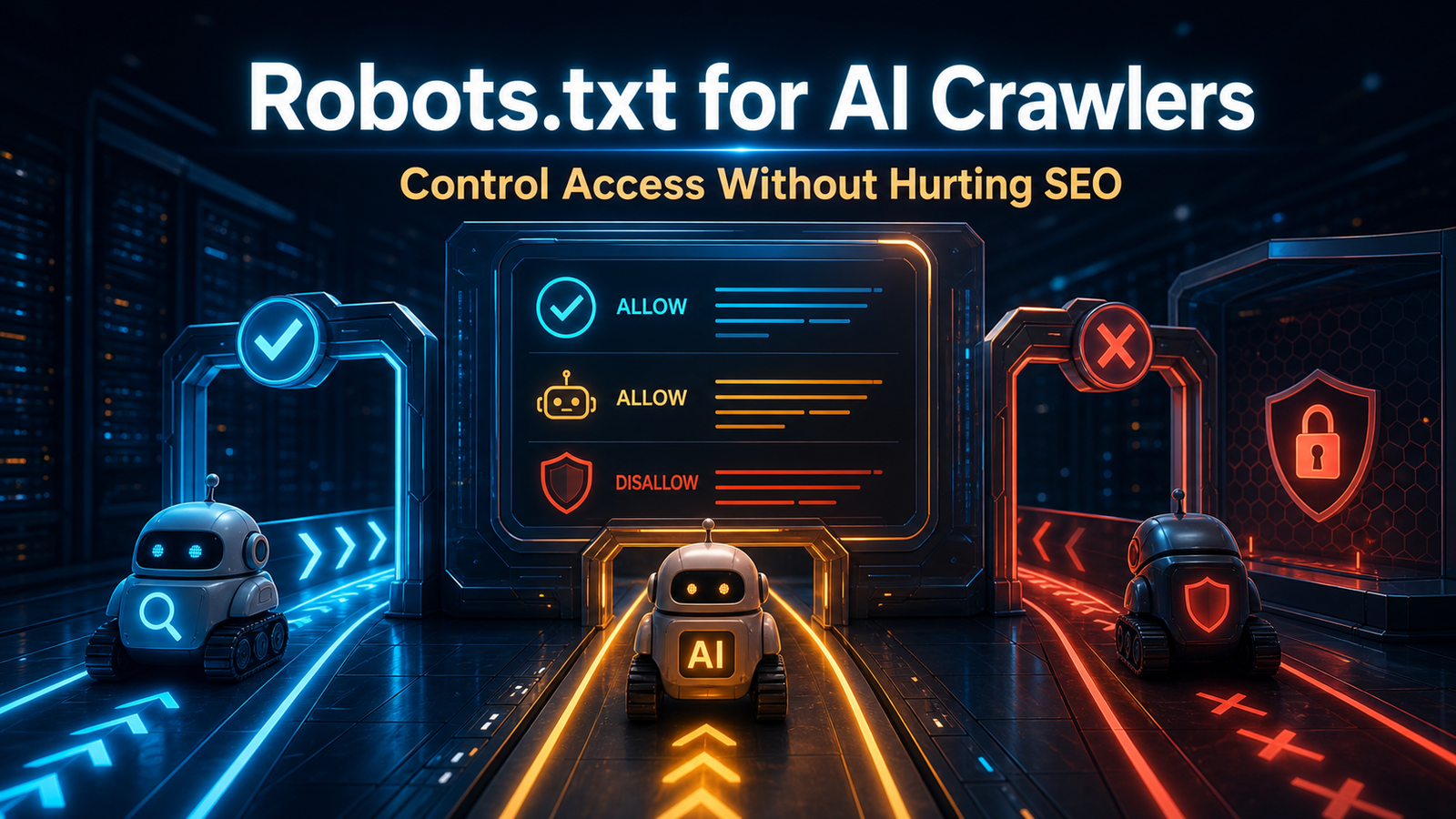
A website Robots txt file is a root-level crawler instruction file that tells search engines and AI crawlers which URLs they can or cannot access. Optimizing Robots.txt in 2026 helps improve crawl efficiency, manage AI crawler access, and keep important public pages discoverable for Google Search, Bing, ChatGPT Search, Perplexity, Claude, and other AI-powered search platforms.
Table of Contents
- What Is Robots.txt?
- Why Does Robots.txt Matter for AI Crawlers?
- Which AI Crawlers Should You Know?
- How Should You Decide Which AI Crawlers to Allow?
- What Is a Good Robots.txt Setup for WordPress?
- How Do You Optimize Robots.txt for GPTBot?
- How Do You Optimize Robots.txt for ClaudeBot?
- How Do You Optimize Robots txt for PerplexityBot?
- How Do You Optimize Robots.txt for Google-Extended?
- What Robots txt Mistakes Hurt SEO and GEO?
- How Do You Test Robots.txt Changes?
- What Is an AI-Friendly Robots.txt Template?
- How Can Triomize Help with Robots.txt and AI Crawler Optimization?
What Is Robots.txt?
Robots.txt is a plain text file placed at the root of a website to give crawler instructions. For example, a site at https://example.com usually places the file at https://example.com/robots.txt.
Google’s Robots.txt documentation says a Robots.txt file tells search engine crawlers which URLs the crawler can access on your site. Google also explains that it is mainly used to manage crawler traffic and is not a reliable way to hide pages from Google.
A simple file can look like this:
User-agent: *
Disallow: /wp-admin/
Allow: /wp-admin/admin-ajax.php

Sitemap: https://example.com/sitemap.xml
The User-agent line identifies the crawler. The Disallow line blocks a path. The Allow line opens a specific path. The Sitemap line points crawlers to your XML sitemap.
For WordPress sites, Robots.txt is often generated virtually by WordPress or an SEO plugin. That means you may not always see a physical file unless you create one. Still, crawlers read the output at /robots.txt, not your plugin settings screen.
Why Does Robots.txt Matter for AI Crawlers?
Robots.txt matters for AI crawlers because AI search platforms now use different bots for different purposes. Some bots support model training. Some support search results. Some support live user requests. Blocking all bots the same way can hurt AI discoverability.
OpenAI documents 4 crawler or fetcher roles: OAI-SearchBot, OAI-AdsBot, GPTBot, and ChatGPT-User. OAI-SearchBot is used to surface websites in ChatGPT Search. GPTBot is used for content that may help improve generative AI foundation models. ChatGPT-User is used for certain user actions.
Anthropic documents 3 Claude bots: ClaudeBot, Claude-User, and Claude-SearchBot. Anthropic says its bots honor Robots.txt directives and support Crawl-delay where appropriate.
Perplexity documents 2 user agents: PerplexityBot and Perplexity-User. Perplexity says PerplexityBot is designed to surface and link websites in search results on Perplexity, while Perplexity-User supports user actions and generally ignores Robots.txt because the fetch is user requested. Perplexity also publishes 2 IP-range JSON endpoints for bot verification.
Google-Extended is different. It is a Robots.txt product token that controls certain Gemini and Vertex AI uses. It is not a separate visible crawler user agent like Googlebot.
This is why AI Crawler Monitoring matters. You need to know which bots visit your site before deciding which ones to allow or block.
Which AI Crawlers Should You Know?
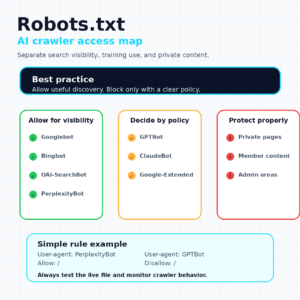
Website owners should know the major AI crawlers and what they do before editing Robots.txt. The goal is not to allow everything or block everything. The goal is policy clarity.
The most important lesson is separation. GPTBot is not the same as OAI-SearchBot. ClaudeBot is not the same as Claude-SearchBot. PerplexityBot is not the same as Perplexity-User.
| Crawler or token | Company | Main purpose | Robots.txt note |
|---|---|---|---|
GPTBot |
OpenAI | Model training | Block if you do not want training use |
OAI-SearchBot |
OpenAI | ChatGPT Search | Allow if ChatGPT Search visibility matters |
ChatGPT-User |
OpenAI | User-triggered actions | May not follow automatic crawler rules the same way |
ClaudeBot |
Anthropic | Model training | Anthropic says it honors Robots.txt |
Claude-SearchBot |
Anthropic | Search quality | Blocking may reduce Claude search visibility |
Claude-User |
Anthropic | User-directed access | Controls user-requested web retrieval |
PerplexityBot |
Perplexity | Search results and citations | Perplexity recommends allowing it for visibility |
Perplexity-User |
Perplexity | User-triggered fetching | Generally ignores Robots.txt |
Google-Extended |
Gemini AI use control | Control token, not a separate HTTP user agent | |
Googlebot |
Google Search crawling | Blocking can hurt SEO and AI Overview eligibility | |
Bingbot |
Microsoft | Bing and related search crawling | Supports Bing and Copilot discovery layers |
How Should You Decide Which AI Crawlers to Allow?
You should decide which AI crawlers to allow based on your business goals. A publisher may want search visibility but not model training. A SaaS company may want all public docs discoverable. A membership site may want private content blocked completely.
Use this decision model:
| Goal | Suggested policy |
|---|---|
| Appear in ChatGPT Search | Allow OAI-SearchBot |
| Avoid OpenAI training use | Disallow GPTBot |
| Appear in Perplexity citations | Allow PerplexityBot |
| Control Gemini AI use | Configure Google-Extended |
| Keep Google SEO visibility | Do not block Googlebot |
| Keep Bing and Copilot visibility | Do not block Bingbot |
| Protect private content | Use authentication, not only Robots.txt |
Robots.txt is a cooperative instruction system. The Robots Exclusion Protocol was formalized as RFC 9309 in 2022, but bad crawlers may still ignore it. For private content, use password protection, membership permissions, server rules, or noindex where appropriate.
Google specifically warns that Robots.txt is not a mechanism for keeping a web page out of Google. A blocked URL can still appear in search if linked elsewhere, although Google may not show a description.
What Is a Good Robots.txt Setup for WordPress?
A good Robots.txt setup for WordPress allows important content, blocks low-value admin paths, points to the sitemap, and avoids blocking resources needed for rendering. It should be simple.
A basic WordPress-friendly example:
User-agent: *
Disallow: /wp-admin/
Allow: /wp-admin/admin-ajax.php

Sitemap: https://example.com/sitemap.xml
This setup blocks the admin area while allowing admin-ajax.php, which many WordPress themes and plugins need. It also gives crawlers the sitemap location.
Avoid blocking these without a strong reason:
/wp-content/uploads/- CSS files.
- JavaScript files needed for rendering.
- Blog posts.
- Product pages.
- Category pages you want indexed.
- Documentation pages.
If your site uses security plugins, WAF rules, CDN bot protection, or server-level blocks, Robots.txt is only part of the crawler access story. A crawler may be allowed in Robots.txt but blocked by Cloudflare, a firewall, or rate limiting.
This is where tools like Triomize can help by connecting technical SEO, AI crawler monitoring, and GEO readiness.
How Do You Optimize Robots.txt for GPTBot?
You optimize Robots.txt for GPTBot by deciding whether OpenAI can crawl your public content for model training. GPTBot is not the same as ChatGPT Search.
If you want to block training use:
User-agent: GPTBot
Disallow: /
If you want to allow GPTBot:
User-agent: GPTBot
Allow: /
If you want ChatGPT Search visibility, focus on OAI-SearchBot separately:
User-agent: OAI-SearchBot
Allow: /
This distinction matters. Blocking GPTBot does not automatically mean your site is blocked from ChatGPT Search. OpenAI says each crawler setting is independent.
For the content side, read ChatGPT Search Optimization.
How Do You Optimize Robots.txt for ClaudeBot?
You optimize Robots.txt for ClaudeBot by deciding which Anthropic bots can access your public content. Anthropic documents separate bots for training, user access, and search.
To block Claude training access:
User-agent: ClaudeBot
Disallow: /
To allow Claude search indexing:
User-agent: Claude-SearchBot
Allow: /
To allow user-directed Claude access:
User-agent: Claude-User
Allow: /
Anthropic says its bots honor Robots.txt directives and respect anti-circumvention technologies like CAPTCHAs. It also supports Crawl-delay.
Example:
User-agent: ClaudeBot
Crawl-delay: 1
Use Crawl-delay carefully. Not every crawler supports it, and Google does not use it for Googlebot.
How Do You Optimize Robots.txt for PerplexityBot?
You optimize Robots.txt for PerplexityBot by allowing it to access public pages you want Perplexity to surface and cite. Perplexity says PerplexityBot is designed to surface and link websites in search results on Perplexity.
To allow PerplexityBot:
User-agent: PerplexityBot
Allow: /
To block it:
User-agent: PerplexityBot
Disallow: /
Perplexity also documents Perplexity-User, which supports user-triggered requests and generally ignores Robots.txt because the user requested the fetch.
If Perplexity visibility matters, make sure your public guides, product pages, documentation, and research pages are accessible. Then strengthen the content with direct answers, schema, citations, and topical authority.
For strategy, read Perplexity SEO and How to Get Cited by Perplexity AI.
How Do You Optimize Robots.txt for Google-Extended?
You optimize Robots.txt for Google-Extended by deciding whether Google can use your content for certain Gemini and Vertex AI use cases. Google-Extended is a product token, not a separate crawler user agent.
To block covered Google-Extended uses:
User-agent: Google-Extended
Disallow: /
To allow them:
User-agent: Google-Extended
Allow: /
Important: blocking Google-Extended does not block Googlebot and does not remove your pages from Google Search. Do not block Googlebot unless you want to hurt traditional SEO visibility.
For Google AI Overviews, Google’s documentation says pages need to be indexed and eligible to appear in Google Search with a snippet. If you block Googlebot from important content, you can reduce both Google Search and AI Overview eligibility.
Read Google AI Overviews Explained for the broader strategy.
What Robots.txt Mistakes Hurt SEO and GEO?
Robots.txt mistakes can hurt both SEO and GEO because they block discovery, indexing, AI crawler access, or rendering. Many mistakes happen during migrations, staging pushes, security hardening, or plugin changes.
Avoid these mistakes:
- Blocking Googlebot. This can remove important pages from Google discovery.
- Blocking CSS and JavaScript. Crawlers may not render pages correctly.
- Blocking uploads. Images and media may lose visibility.
- Using Robots.txt for private content. Use authentication instead.
- Blocking all AI crawlers without strategy. This can reduce AI search visibility.
- Forgetting the sitemap. Add your XML sitemap URL.
- Leaving staging rules live.
Disallow: /can destroy visibility if pushed to production. - Assuming Robots.txt controls indexing. It controls crawling, not guaranteed indexing.
- Ignoring WAF rules. Firewall blocks can override crawler access.
The most dangerous line is this:
User-agent: *
Disallow: /
Use it only when you intentionally want to block all crawlers from the entire site.
How Do You Test Robots txt Changes?
You test Robots.txt changes by checking the live file, validating syntax, watching crawler behavior, and reviewing search console reports. Do not edit Robots.txt blindly.
Use this workflow:
- Visit
https://yourdomain.com/robots.txtin a browser. - Confirm the live output matches your intended policy.
- Test important URLs in Google Search Console.
- Check Bing Webmaster Tools.
- Review server logs for crawler status codes.
- Monitor AI crawler visits.
- Confirm the XML sitemap is listed and accessible.
- Recheck after plugin, theme, CDN, or security changes.
For WordPress, remember that plugins may generate Robots.txt dynamically. If you create a physical file, it may override the virtual output.
After a change, give crawlers time to recrawl the file. Some systems update quickly. Others may take longer.
What Is an AI-Friendly Robots txt Template?
An AI-friendly Robots.txt template separates traditional search, AI search, training crawlers, and private content. The exact policy depends on your goals, but this example shows a balanced approach.
User-agent: *
Disallow: /wp-admin/
Allow: /wp-admin/admin-ajax.php

User-agent: OAI-SearchBot
Allow: /

User-agent: GPTBot
Disallow: /

User-agent: PerplexityBot
Allow: /

User-agent: Claude-SearchBot
Allow: /

User-agent: ClaudeBot
Disallow: /

User-agent: Google-Extended
Disallow: /

Sitemap: https://example.com/sitemap.xml
This example allows search-focused AI discovery while blocking some training-related uses. It is not the right policy for every site. Some brands may allow training crawlers. Others may block more agents.
Before using any template, define your policy:
- Do you want AI citations?
- Do you want AI training access?
- Do you publish public documentation?
- Do you have private or paid content?
- Do you rely on Google and Bing traffic?
- Do you monitor bot behavior?
Robots.txt should reflect policy, not panic.
How Can Triomize Help with Robots txt and AI Crawler Optimization?
Triomize can help with Robots.txt and AI crawler optimization by connecting crawler access to SEO, AEO, and GEO workflows. Robots.txt affects whether search engines and AI systems can access your content, but access alone is not enough.
Triomize helps WordPress teams think through:
- SEO crawlability.
- AEO answer structure.
- GEO citation readiness.
- AI crawler monitoring.
- Schema opportunities.
- Internal linking.
- Sitemap detection.
- Content freshness.
- Technical issue discovery.
A page can have perfect content and still fail if crawlers cannot access it. A page can be crawlable and still fail if it lacks structure or trust. Triomize helps identify those gaps from a single WordPress workflow.
For related reading, see AI Search Optimization, AI Visibility, and AI Search Ranking Factors.
Frequently Asked Questions
What is Robots.txt?
Should I block GPTBot?
Should I allow PerplexityBot?
Does Robots.txt affect Google AI Overviews?
Is Robots.txt enough to protect private content?
How often should I audit Robots.txt?